TFS – Disabling Continuous Integration with NO-CI
How to stop a TFS 2008 check-in from triggering an endless continuous integration build loop, using the ***NO_CI*** comment trick.

This is kind of a “known thing” to those of us who automate team builds tasks in TFS with build scripts but there are still a lot of people who don’t know this… so here we go…
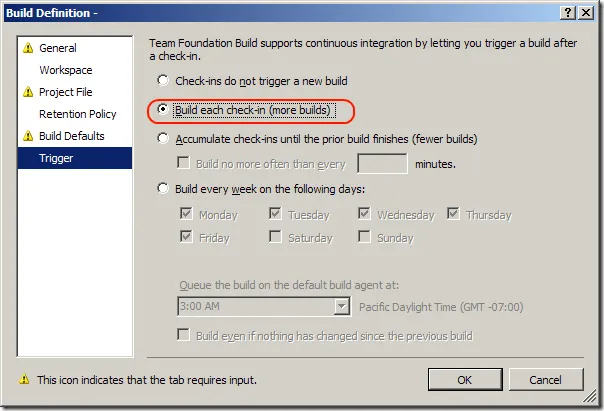
The 2008 version of TFS implemented Continuous Integration. In TFS, a build is triggered upon every check-in (if you have that option enabled in TFS). This can be setup in the build definition as shown below:
When anyone checks a file into the workspace that is defined within the build (see the “Workspace” area in the image above), TFS will kick off a build.
Sometimes you’ll need to automate your build through some custom MSBuild tasks and during that time you may need to check a file back into TFS after a build. Why? Perhaps you’re generating some code on the fly, based upon the output of the build. Perhaps you’re generating Xml documentation and you need to drop that back into the source repository for whatever reason. When you check code back into TFS, TFS will kick off a build, quickly leading to an endless loop.
How To Get Around This
Place the following into the comment field: ***NO_CI*** You can also use the $(NoCICheckinComment) Property in a build file. This property is set at runtime when MSBuild is started from the TFS Build agent.
The “***NO_CI***” comment will instruct team build to ignore this changeset as a trigger for continuous integration.