Reducing OpenClaw Token Costs with claw-llm-router
Right model, right time. Save tokens.


I set up OpenClaw a few weeks ago on a spare machine I had in my house and within a few days it has already used up over $50 USD in Claude API token usage. Thankfully I had set up spend limits on the Claude API account so my financial risk was capped (highly recommend doing this to avoid a surprise $1K+ bill).
Here’s the thing that surprised me about OpenClaw and the cost of this all …
OpenClaw wasn’t doing anything special, it’s just naturally chatty by default due to how it works and that it was defaulting to Opus 4.6 for everything 😬 (That was mistake number 1 - using a frontier model for this out of the box).
Lowering Costs with Lower Tiered Models
There are various reasons why OpenClaw burns through tokens and ways to optimize it so it’s not so chatty and costly. One of the easiest ways is to use a cheaper (and less capable model).
For example, instead of using Claude Opus for your claw you could use Claude Haiku. This alone can save you 5x to 60x in costs based upon the model configuration and what its doing. However the tradeoff is that you now have all your OpenClaw conversations going through a less capable model. This works fine for very simple tasks that don’t require any complex reasoning.
However, if you’re using your claw to perform complex tasks this can be a hindrance due to the capabilities of the LLM. The model you’re using isn’t the one that can handle complex reasoning tasks. Therefore you’re left to balance the cost vs capability spectrum using a more capable model, but still more costly - something like Claude Sonnet, etc.
The alternative approach is to use something like MiniMax 2.5, Kimi K2.5 (or whatever the new hot cheap LLM is). But, again, that comes with its own risks, and that’s a topic unto itself.
Other Ways to Lower Costs
There are other ways to lower costs too. There are some great options and this walkthrough here by @KSimback is superb. In his post he has some great discussions around model costs/etc why OpenClaw is costly, how to lower them, etc. I recommend bookmarking and reading that.
Let’s briefly cover some of those same options he mentioned below:
OpenRouter
One such way to lower costs is by using something like OpenRouter. OpenRouter is one of the more popular model routers out there. OpenRouter will perform smart routing to various different models based off some prompt analysis on their side.
The sticking point with OpenRouter is that you pay OpenRouter for access to all these models via a pay-per-token model (typically in MTok - millions of tokens).
Also, all your prompts go through OpenRouter.
OpenRouter states that they do not store your prompts but do sample a fraction for system improvements. For some people (and many companies) this is a no-go zone due to various reasons that are beyond the scope of this article.
ClawRouter
Another popular up-and-coming method of model routing is using ClawRouter. ClawRouter aims to lower inference costs by classifying the prompt locally and sending off the prompt to the appropriate model provider for the classified prompt type. This, in turn, dramatically lowers the cost profile of your OpenClaw because it’s using lower tiered models for simple requests and more advanced models for complex and reasoning tasks. This is completely configurable to your set up.
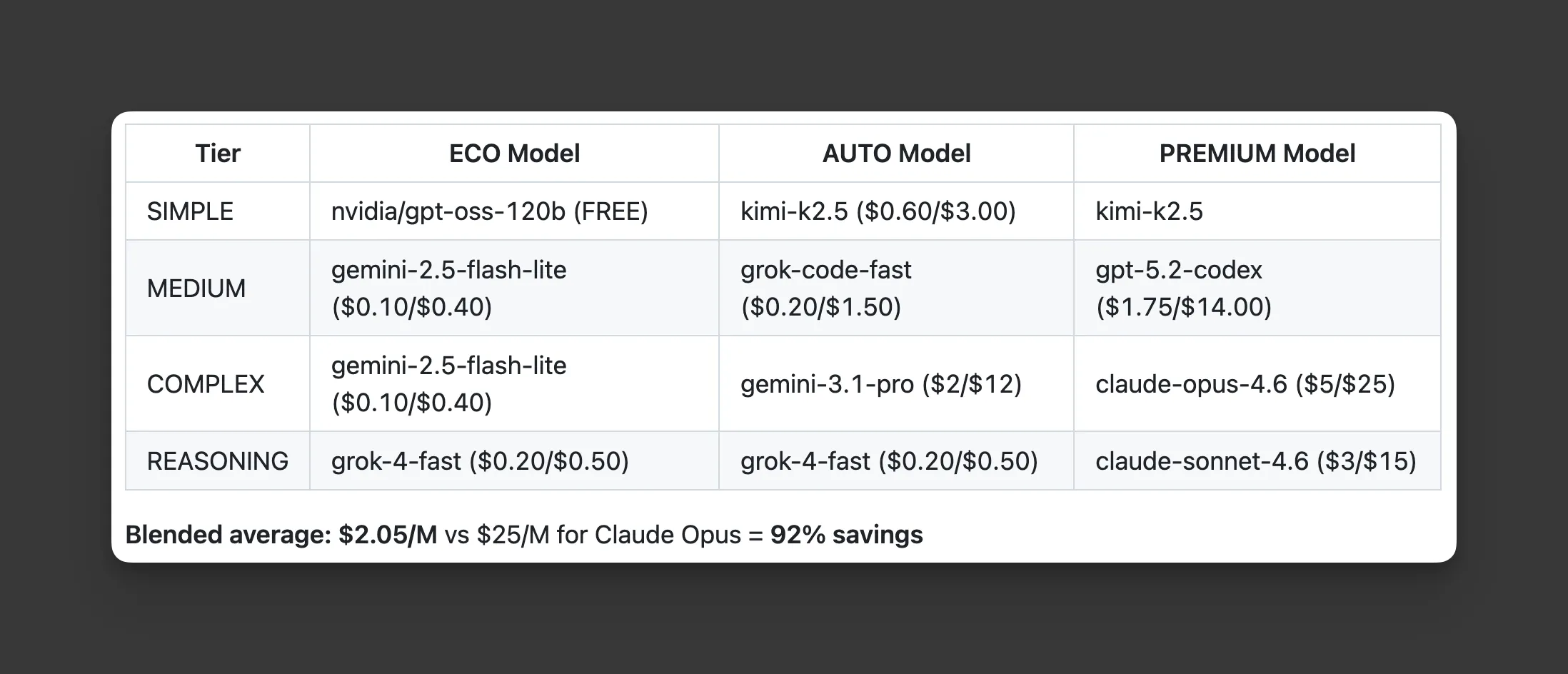 Image captured from github.com/BlockRunAI/ClawRouter
I loved this idea!
Until I saw that my prompts were sent through their remote system and it required additional payment there.
I didn’t want my prompts going to a third party and I did not want yet another provider to pay for.
So I built claw-llm-router.
Local Classification and Routing with claw-llm-router
I wanted a similar LLM routing system as ClawRouter to save money, but without sending my prompts to a third party and I did not want to have to pay for an additional service.
So I built claw-llm-router - an OpenClaw plugin that does exactly this.
Claw LLM Router will take your prompt, classify it locally, and then send the prompt to the configured LLM model you specified for each task type, directly - not through a third party:
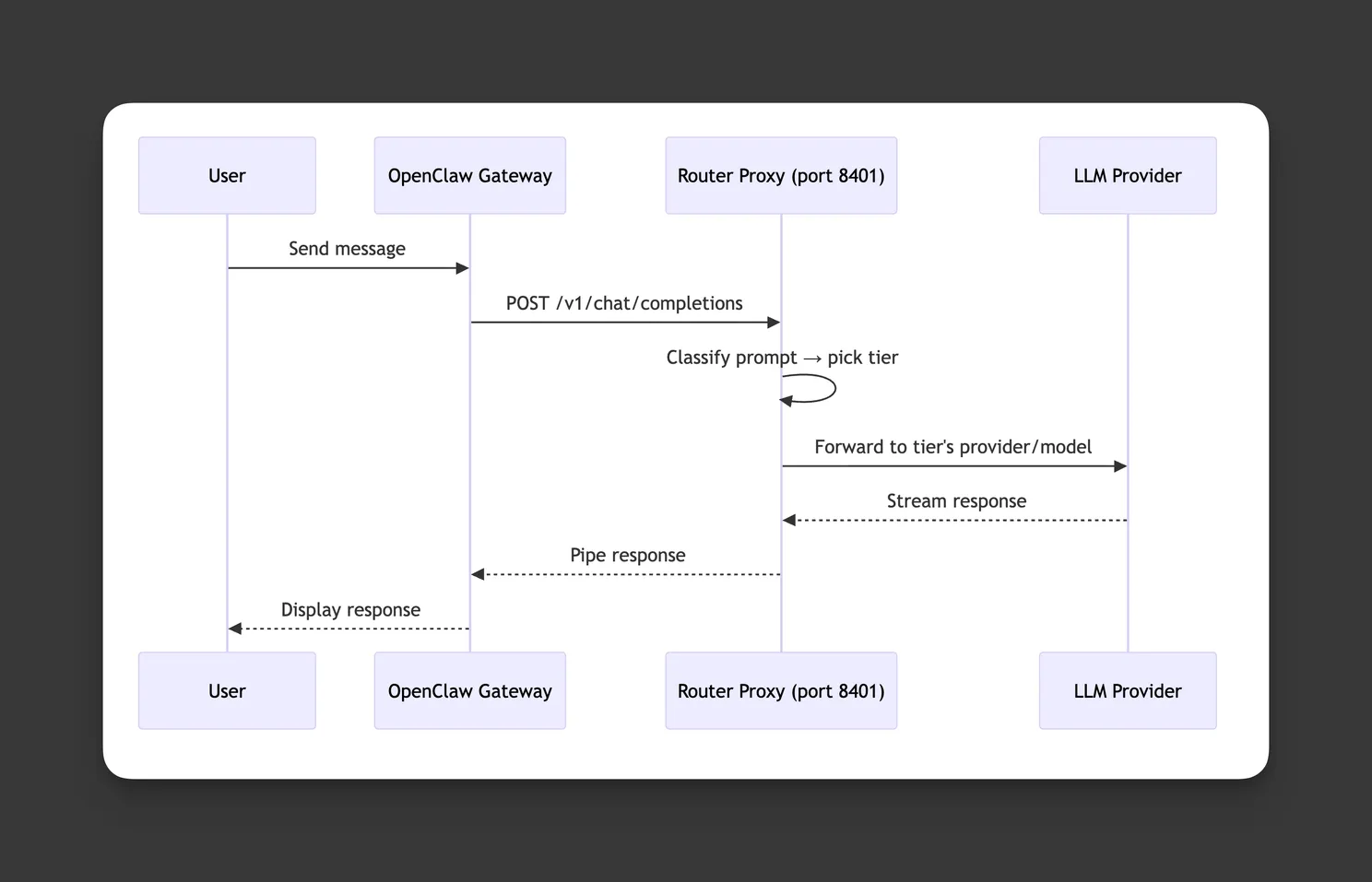 Screen capture from github.com/donnfelker/claw-llm-router
Here’s an example model breakdown that shows how I used Gemini 2.5 Flash for simple prompts (super cheap) and then a Claude Max plan for other things (apparently Claude has said that it’s ok for personal use - we’ll see how that pans out, but I still wanted to support it in the mean time):
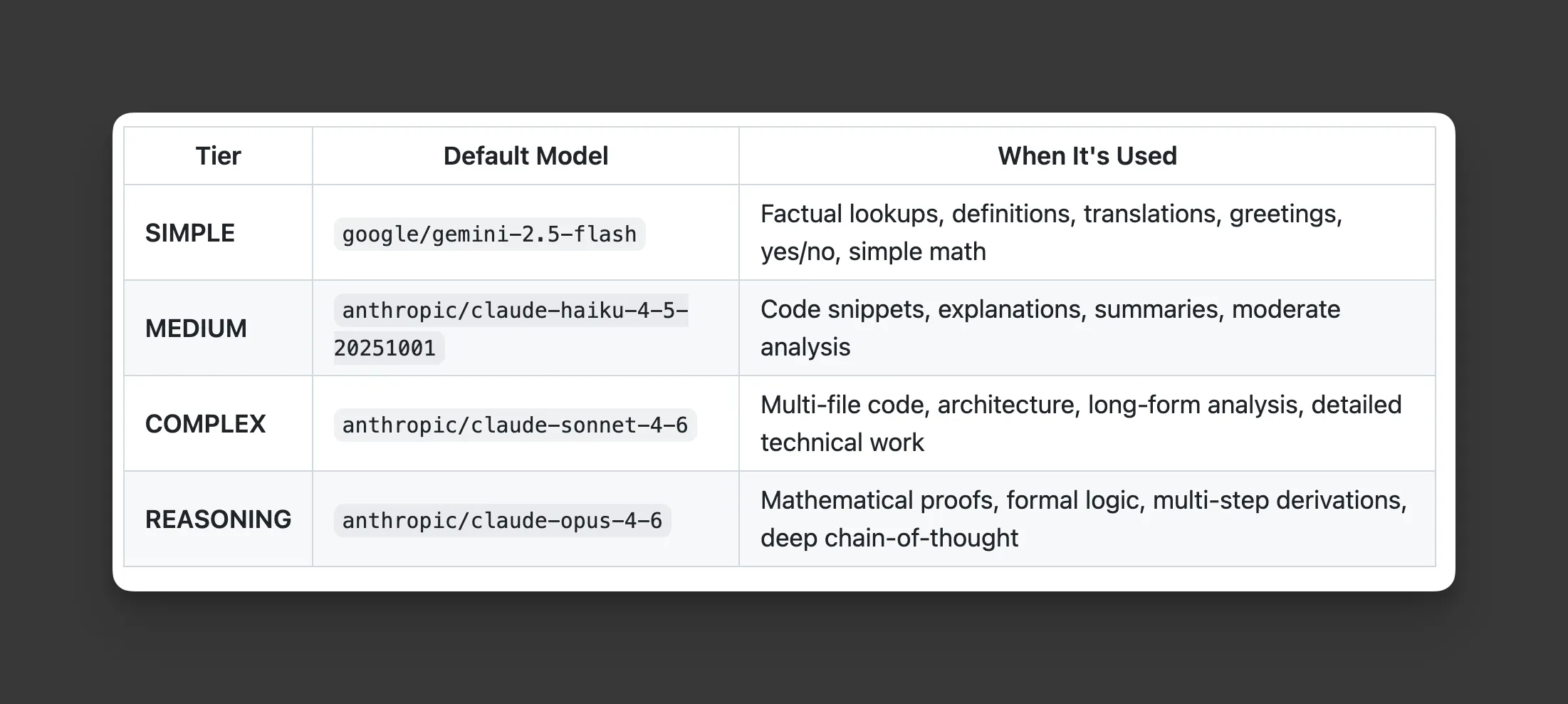 Screen capture from github.com/donnfelker/claw-llm-router
- Local Classification
- Local Routing
- Prompts to only be sent to the LLM Providers, not a third party
- Support for personal use only Claude Max plans
- No Additional Costs from external providers/services
Here’s how it works …
Installation and Configuration
Claw LLM Router is installed as an OpenClaw plugin (see install directions here).
Once you set up the LLM providers that you want to use (get your API keys set up, etc), then enable it, and issue prompts. All prompts get routed through the claw-llm-router proxy (as shown in the sequence diagram above).
Local Classification
All classification is done locally on the claw.
One thing I liked about ClawRouter was that classification was also done locally. The approach was simple and it worked fairly well and did not incur additional LLM costs.
The claw-llm-router local classifier approach is based off of ClawRouter’s approach - hat tip to the ClawRouter team for that.
Local Model Routing
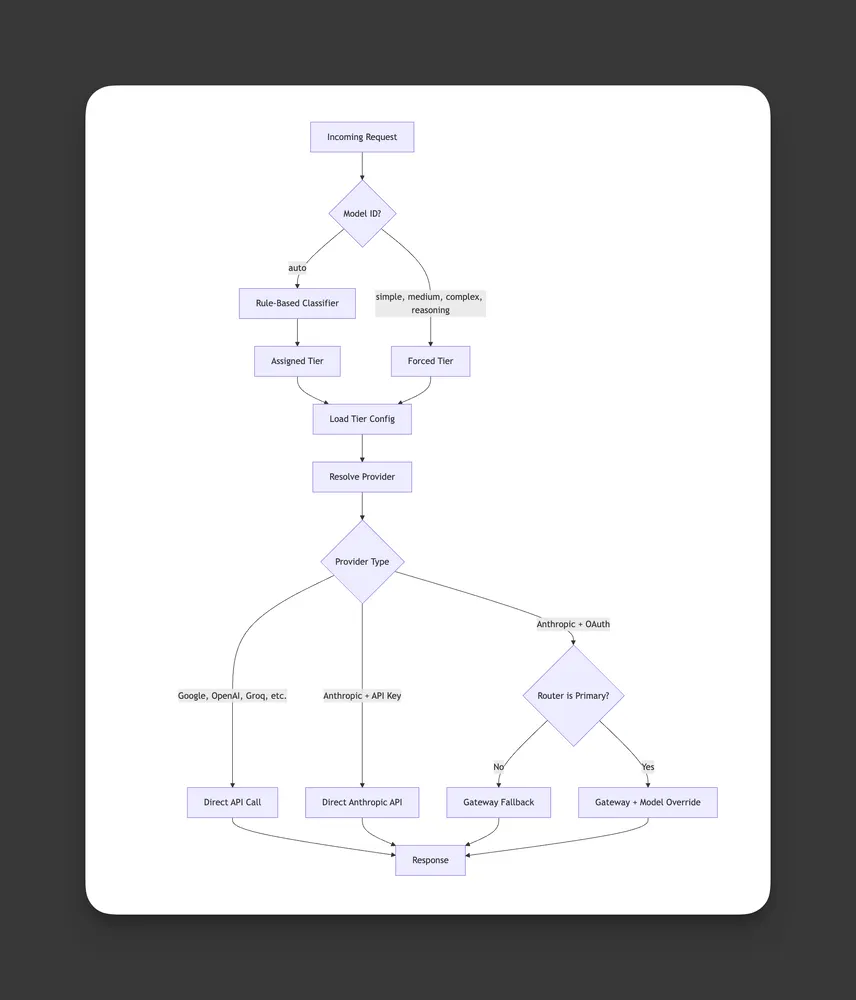
Once local classification is complete claw-llm-router will send the request directly to the configured LLM. This requires that you have this LLM set up in your claw. No prompts are sent to any third party, it’s simply a local LLM router based upon the classification done locally:
 Screen capture from github.com/donnfelker/claw-llm-router
The architecture is simple and new LLM model support can be added easily by following the PROVIDERS.md doc in the repo.
V1 Has Been Released
I built this for myself because it’s what I wanted and needed.
It’s free to install and use, check out Claw LLM Router here.
So far, it’s working well for me, but as with any new software - it likely has some kinks that need to be worked out. If you try it out, be sure that you set up your model providers beforehand and use openclaw logs for debugging in case anything goes wrong. I highly advise setting this up with Claude or another LLM on your system so it can help debug if anything goes sideways. Back up your ~/.openclaw/openclaw.json file (it does this for you automatically) - see the README in the repo for full details.
Warning: 🚨 If misconfigured, this can leave your claw in a broken state, but you can undo this with the troubleshooting steps as mentioned in the README.
It’s open source, so feel free to fork it, submit some pull requests, etc.
Enjoy.