My Favorite Git Alias
Tired of unreadable git log output, I found the git lg alias -- a one-line git config addition that makes your commit history actually scannable.

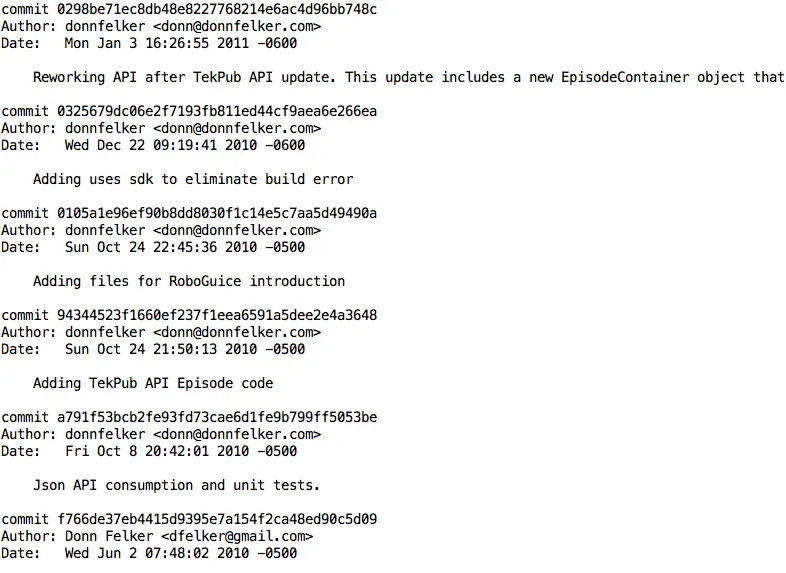
I’ve been using Git for almost two years now and I personally feel it is the superior version control system. One complaint I did have when I first started using it was that the log command had horrible output for readability. Examples speak louder … the command:
git logOutputs this (click for larger):
While you can read it, 95 % of the time this view is not helpful. I usually want to see the commit message, the first part of the guid of the commit and the user who made the change along with some date time details.Thankfully someone already created this git alias and I use it more than I ever thought I would.
Community To The Rescue
A fellow by the name of Bart created an alias that that is named “lg”. The command is as follows:
git lgand the output in all its glory is the following (click for larger):
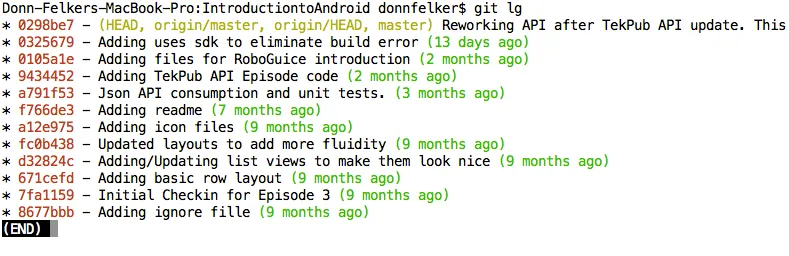
Ahhhh… much more readable. I love it.
Get the Alias
To get the alias, visit Bart’s blog or if for any reason that it might be down, paste the following into your git command prompt:
<pre><code>git config --global alias.lg "log --graph --pretty=format:'%Cred%h%Creset -%C(yellow)%d%Creset %s %Cgreen(%cr)%Creset' --abbrev-commit --date=relative"</code></pre>This will add the “git lg” alias to your user .gitconfig file.
Enjoy!


