Living Together Harmoniously – IntelliJ and Maven
Getting No valid Maven installation found in IntelliJ? Skip the env variable rabbit hole and just set the Maven home path in IDE settings.

I’m working on a client project and I ran into an issue when I needed to run a maven task from within IntelliJ. When I would run it, it would return the following error.
Error running Tests: No valid Maven installation found. Either set the home directory in the configuration dialog or set the M2_HOME environment variable on your system.
Which… really stinks. After setting my global env variable, playing with as .MacOSX file and then a bunch of other stuff for around 20 minutes … I realized it was a lot easier if I just checked the settings in the Maven settings in IntelliJ. So, thats what I did.
I selected this icon:
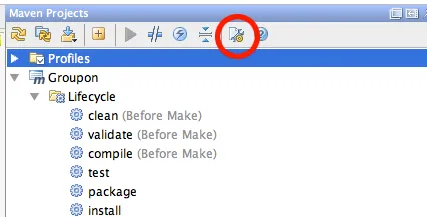
Then got this settings panel:
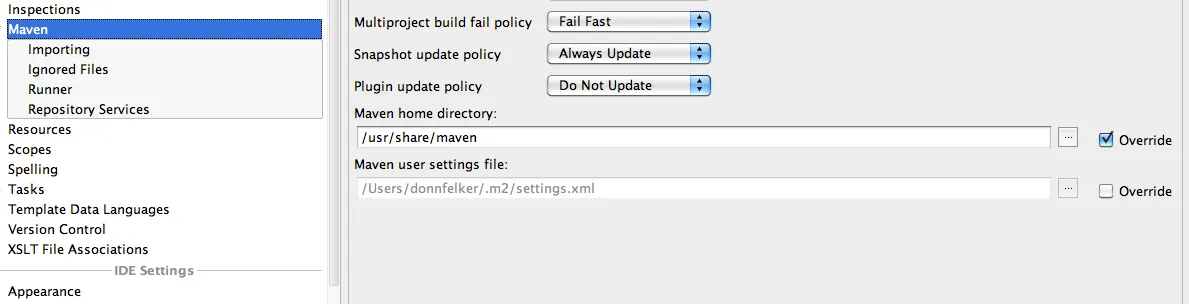
I overrode the maven home page and supplied my own maven home path as follows (see the path set above?):
[javasscript]
/usr/share/maven
[/javascript]
Note, your maven install directory may be different. As soon as I set this, I could run maven from within IntelliJ.
The sad fact of the matter is that I didn’t look here first. The error message supplied by IntelliJ sent me off into a rabbit hole. Thankfully it only cost me 20 minutes.


