ASPNET MVC: Handling Multiple Buttons on a Form with jQuery
How to handle multiple submit buttons in one ASP.NET MVC form using jQuery to swap the form action, keeping controller actions clean and simple.

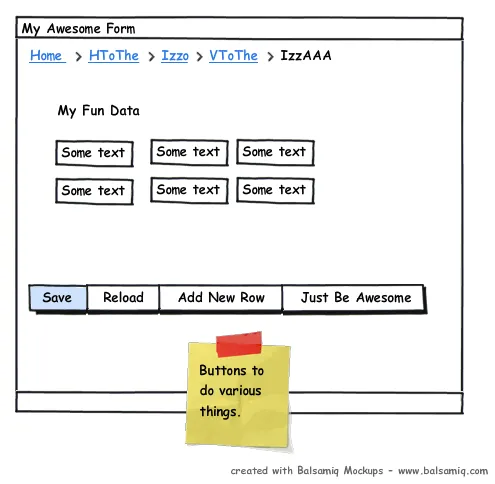
Sometimes your task in MVC involves many buttons in the same form. Such as the screen shot here.
What happens in most situations is that you end up having some code that kind of looks like this:
<form action="/foo/save">
<!-- My HTML and multiple buttons -->
</form>
… and then the code looks like this
public ActionResult Save(CustomerList customers, string buttonName)
{
if(buttonName == "Save")
{
// do something
}
else if (buttonName == "Reload")
{
// etc, etc
}// Other if's, etc, etc
}
We can solve this with a little jQuery. By attaching a click handler to the button we can tell the form where we want it to go. Therefore keeping our controllers actions very slim.
Here’s the jQuery:
// This assumes your buttons have id's "save-button" and "update-button"
$("#save-button").click(function () {
 // Redirect to add facility for Credit Exposure var form = $(this).parents('form:first'); form.attr('action', '<%=Url.RouteUrl(new { controller = "foo", action = "save"  }) %>');});
$("#reload-button").click(function () {
 // Redirect to add facility for Credit Exposure var form = $(this).parents('form:first'); form.attr('action', '<%=Url.RouteUrl(new { controller = "foo", action = "reload"  }) %>');});
Now when the user clicks “Save” they will go to the “Save” Action on the “FooController”. When the user clicks “Reload” they will go to the “Reload” action on the”FooController”. No more logic switches in the Controller.
You can download and example here (minus the MVC Goo):
aspnet mvc jquery form action modifier
<html>
<head>
  <link href="css/jquery-ui-1.8.custom.css" rel="stylesheet" type="text/css" />
  <script src="Scripts/jquery-1.4.2.min.js" type="text/javascript"></script>    <script src="Scripts/jquery-ui-1.8.custom.min.js" type="text/javascript"></script>
  <script>  $(function () {


    $("#save-button").click(function () {      var form = $(this).parents('form:first');      form.attr('action', 'http://example.org/foo/save');    });
    $("#reload-button").click(function () {      var form = $(this).parents('form:first');      form.attr('action', 'http://example.org/foo/reload');    });
    $("#add-row-button").click(function () {      var form = $(this).parents('form:first');      form.attr('action', 'http://example.org/foo/addrow');    });
    $("#beawesome-button").click(function () {      var form = $(this).parents('form:first');      form.attr('action', 'http://example.org/foo/beawesome');    });  });

  </script>
</head>
<body><form action="/foo/go" method="post">  <div id="bar">    <div id="foo">
      <input type="text" /> <input type="text" /> <input type="text" /> <input type="text" /> <br/>      <input type="text" /> <input type="text" /> <input type="text" /> <input type="text" /> <br/>

    </div>    <button id="save-button" type="submit">Save</button    <button id="reload-button" type="submit">Reload</button>    <button id="add-row-button" type="submit">Add Row</button>    <button id="beawesome-button" type="submit">Be Awesome</button>  </div></form></body>
</html>

